Search the right region
Decode a full image or a selected region of interest. Returned corners stay in the coordinates of the supplied image.
Built by FlexIPS · FlexBarcodeSDK
Data Matrix reading for the images your production line actually sees. Our own native SDK locates and decodes marks on labels, electronics and industrial parts.
Printed labels
PCB identification
Direct part marks
Multi-code scenes
The evidence is in the image
Explore nine supplied benchmark scenes, from industrial parts to everyday packaging.
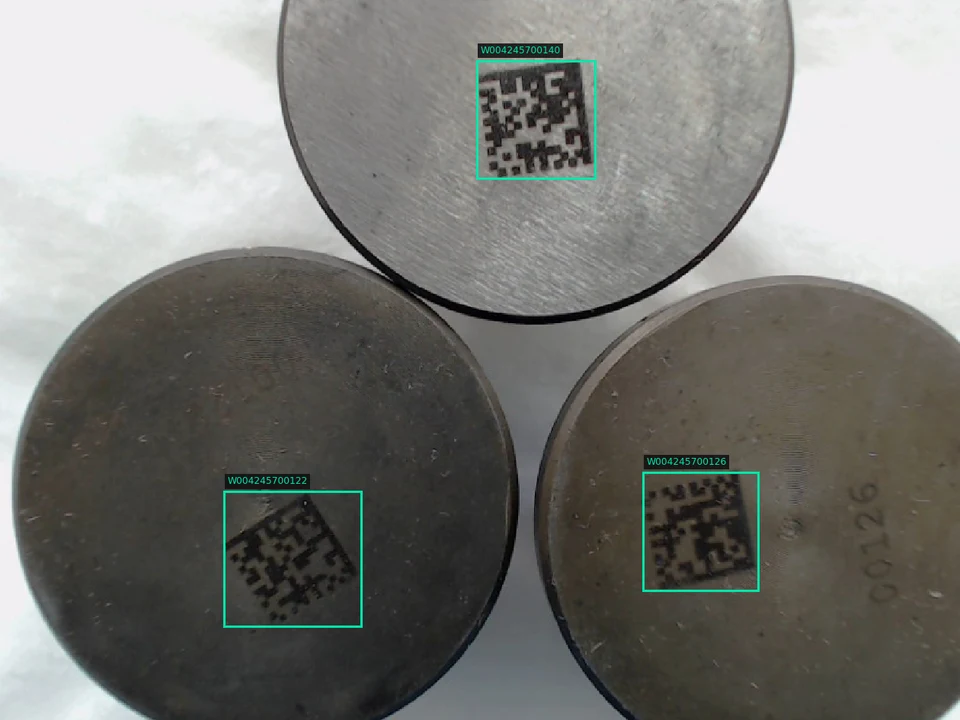
Direct part marks
Multiple marks on brushed metal, with different rotations and surface contrast. Each returned symbol carries its own payload and location.
Returned payloads Data Matrix
W004245700140W004245700122W004245700126Our engine. Your application.
A native Data Matrix decoder built for integration into your imaging workflow. You supply the pixels. The SDK returns the identity and its location.
Decode a full image or a selected region of interest. Returned corners stay in the coordinates of the supplied image.
Get individual payloads and corners for each accepted symbol, including repeated payloads in one scene.
Consume exact payload bytes, UTF-8 text and GS1 flags without reducing the result to a visual pass indicator.
Windows x64 DLL with C and C++ interfaces for integration into existing camera applications.
Designed around your station
Connect the returned identity to the decisions your line needs to make. We help define the capture setup, acceptance rules and traceability flow around your parts.
Explore FlexIPS traceabilityUse your camera image and define the relevant search area. Lighting and focus are part of the evaluation.
FlexBarcodeSDK returns accepted symbols, exact data and image coordinates. Handle a zero-result call explicitly.
Check the expected identity, format and symbol count in your application before making a station decision.
Map accepted identifiers to recipes and unit records. Define retry or operator review when a required code is missing.
Supported codes, camera input and decoding results.
FlexBarcodeSDK reads Data Matrix codes on printed labels and directly marked parts. It returns GS1 flags where present. The current SDK does not decode QR or 1D barcodes.
Yes. Pass grayscale or interleaved color image buffers to the Windows x64 SDK. You can search the whole image or limit decoding to a region of interest. Your application handles image capture.
Each result contains the original payload bytes, UTF-8 text, GS1 flags, symbol corners and available timing. One image can return several symbols. If no symbol is accepted, the call returns an empty result.
That depends on your images, search area and hardware. Send us representative captures and your cycle-time requirement so we can measure it. The difficult-scene benchmark uses a 1000 ms processing budget; it is not a guaranteed timeout.
No. The examples show saved outputs from our final-e8de benchmark. The explorer displays the recorded images, payloads and symbol locations.
Need to check a specific part?
Start with your hardest image
Bring representative images, your expected payloads and your station requirements. Let’s evaluate the read on your parts.